
Every shell. One window.
Termilly groups your terminals into workspaces, brings them back after a restart with their output, and shows you which coding agent is waiting on you.
Windows, Ubuntu and Debian
Comes back after a restart
Your terminals return with their last output, encrypted and saved every half minute.
Every shell, found for you
PowerShell, Command Prompt, Git Bash, WSL, SSH hosts, containers and serial ports.
Follows Claude Code properly
Through Claude Code's own hooks, not by guessing from what it prints.
Stays on your PC
History is encrypted with AES-256, and updates are never installed by themselves.
Close it, crash it, update it. The shells keep running.
Turn on Keep shells running and a background process holds your terminals. The next window picks them up where they were, with everything they printed meanwhile.
All workspaces and layout features How restoring sessions works
- api serverStill running
- testsStill running
- prod-dbStill running
Close the window and termilly-host keeps these running. The next window picks them up.
You see which agent needs you.
Each Claude Code terminal shows what it's doing in its title, its sidebar row and its border. The one asking for permission gets a yellow ring.
- claudeEditing src/api/billing.tsWorking
- reviewerAllow npm test -- billing?Needs you
- docsUpdated README.mdFinished
CtrlShiftJ goes to the one that needs you.
Save a command once, fill in the rest each time.
A snippet is a saved command, with optional variables. If it has any, a small popup asks you to fill them in before it runs. It remembers your last values and shows the finished command first.
kubectl logs -f {{pod}} -n {{namespace=default}}kubectl logs -f api-7d9f4 -n default
Change a value and the command updates.
Find what ran, even after you closed it.
Search the names, tags and output of open and closed terminals. Enter reopens a closed one, with its output above a new prompt.
- api serveracme-api
POST /v1/webhooks/retry 202 12msOpen - testsacme-api
✓ billing/webhooks.test.ts (7 tests) 37msOpen - prod-dbinfra
20261002_webhook_retries okOpen - claudeweb-dashboard
Grep "retryWebhook"Open - migrateinfra
ALTER TABLE webhooks ADD retries intClosed 2 days ago - viteweb-dashboard
hmr update /src/pages/Invoices.tsxOpen - build-boxinfra
RUN npm run buildClosed yesterday
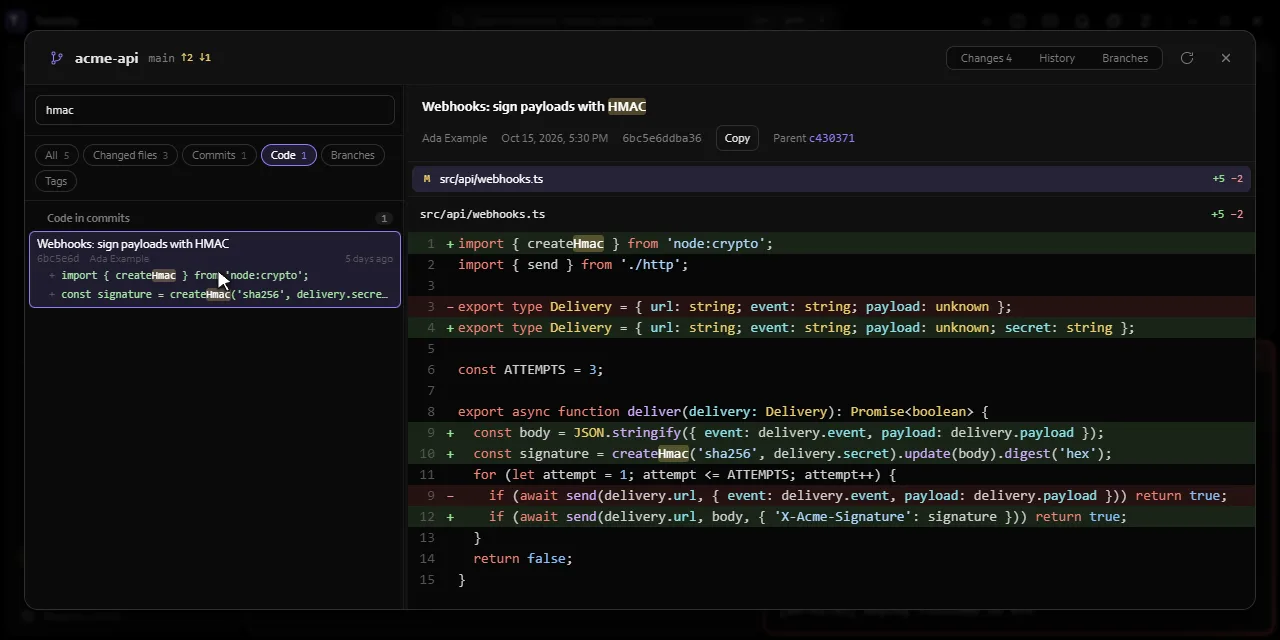
See what changed, without leaving the terminal.
The Git window shows staged and unstaged changes, file diffs, commit history, and branch status. Search everything at once: changed files, diffs, commits, authors, hashes, branches, and tags. Open it from the sidebar or press Ctrl+Shift+G.
Scripts and agents can drive it, within limits you set.
Other programs can talk to the Termilly that's running. A script, a CI job or a coding agent can open terminals in a workspace, type into them, wait for their output and read the result. Agents get the same through its MCP server, and you choose which terminals they may read or type into.
C:\ci> termilly open --workspace acme-api --name "api server" -- npm run dev
t3f9a1c
C:\ci> termilly wait --pane t3f9a1c --match "listening"
acme-api v2.4.0 listening on http://localhost:4000
C:\ci> termilly open --workspace acme-api --name tests
t4b2e07
C:\ci> termilly send "npm test" --pane t4b2e07 --enter
C:\ci> termilly wait --pane t4b2e07
      Tests  39 passed (39)

Download Termilly
Windows 10 (version 1903 or later) and Windows 11, 64-bit, or Debian and Ubuntu.
-
Download
WindowsFull installer
About 270 MB. Carries .NET and WebView2, so it works without an internet connection.
-
Download
WindowsOnline installer
About 10 MB. Downloads .NET and WebView2 from Microsoft while it installs.
-
Download
LinuxDebian and Ubuntu package
About 1 MB. apt installs .NET and WebKitGTK with it.
Or install from a terminal
-
WindowsPowerShell
irm https://termilly.com/install.ps1 | iex -
WindowsCommand Prompt
curl.exe -fsSLo install.cmd https://termilly.com/install.cmd && .\install.cmd && del install.cmd -
LinuxTerminal
curl -fsSL https://termilly.com/install.sh | sh